
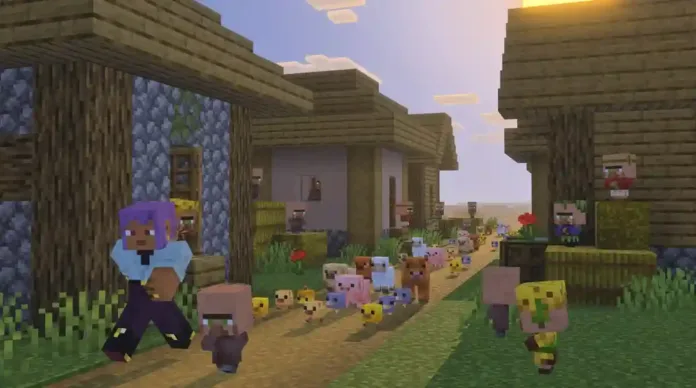
Minecraft update 1.044 (bedrock 26.10) focuses on baby mob improvements, including new models, animations, sounds, and gameplay mechanics. A new Golden Dandelion item allows players to pause baby mob growth. Name Tags are now craftable, mount movement responsiveness has been restored. According to the official Minecraft 1.044 patch notes, the latest MC update 1.044.000 also resolves numerous gameplay, performance, and visual bugs.
Minecraft Version 1.044.000 Patch Notes – March 24, 2026

MC bedrock 26.10 Bug Fixes
Mobs
-
Using a Spawn Egg on the corresponding Mob will now spawn the Baby form of that Mob
-
Updated the models and textures of the following Baby Mobs:
-
Cow
- Tweaked the bounding box of both adult and baby to align with Java Edition and the new model
-
Mooshroom
- Ad -- Tweaked the bounding box of both adult and baby to align with Java Edition and the new model
-
Pig
-
Wolf
- Tweaked the bounding box of both adult and baby to align with Java Edition and the new model
-
Rabbit
- Both adult and baby Rabbits also received new animations
- Tweaked the bounding box to align with the new model
-
Cat
- Tweaked the baby’s bounding box to align with the new model
-
Ocelot
-
Chicken
- Tweaked the bounding box to align with the new model
-
Sheep
-
Axolotl
- Added new baby-specific animations for the Axolotl
-
Dolphin
-
Donkey
-
Horse
-
Mule
-
Skeleton Horse
-
Zombie Horse
-
Glow Squid
-
Squid
-
Turtle
-
Polar Bear
-
Goat
-
Fox
- Added new baby-specific animations for the Fox
-
Camel
- Added new baby-specific animations for the Camel
-
Armadillo
- Added new baby-specific animations for the Armadillo
-
Llama
- Trader Llama
-
Bee
-
Piglin
-
Villager
-
Zombie Villager
-
Zombified Piglin
-
Zombie
-
Husk
-
Drowned
-
Panda
-
Strider
-
Hoglin
-
Sniffer
-
Zoglin
-
Sounds
-
Baby Pigs, Cats, Horses, Cows, Chickens, and Wolves, now have a unique set of sounds
-
Pig, Cat, Cow and Chicken now have adult sound variants
-
Added Note Block trumpet instrument for Block of Copper, Cut Copper and Chiseled Copper
Golden Dandelion
-
Introduced Golden Dandelion as a new type of flower that can be used to stop baby mobs from aging
- Can be crafted using a Dandelion and Gold Nuggets
-
Enabled the Golden Dandelion effect on the following Baby Mobs:
- Baby Armadillo
- Baby Axolotl
- Baby Bee
- Baby Camel
- Baby Cat
- Baby Chicken
- Baby Cow
- Baby Dolphin
- Baby Donkey
- Baby Fox
- Ghastling
- Baby Hoglin
- Baby Goat
- Baby Horse
- Baby Llama
- Baby Mooshroom
- Baby Mule
- Baby Nautilus
- Baby Ocelot
- Baby Panda
- Baby Pig
- Baby Polar Bear
- Baby Rabbit
- Baby Sheep
- Baby Sniffer
- Baby Strider
- Baby Trader Llama
- Baby Turtle
- Baby Wolf
- Tadpole
-
Golden Dandelion can be used to craft Suspicious Stew
-
Golden Dandelion can be crafted into Yellow Dye
-
Placed Golden Dandelion can be picked up by Endermen
-
Golden Dandelion can be picked up by mobs who can pick up items
-
Golden Dandelion can be used to distract Piglins
-
Golden Dandelion displays green particles when used on a Baby Mob
- Particles moving downwards indicate that aging is paused
- Particles moving upwards indicate that age has been reset and is now resumed
-
Golden Dandelion plays pause growth and reset growth sounds on use
Items
- Name Tags are now craftable, using paper and any metal nugget
Features and Bug Fixes
Accessibility
-
Fixed issue where text to speech doesn’t get enabled on launch despite the ‘Text To Speech For UI’ toggle being enabled
-
Added a key binding for Describe, a feature that will let you know through text and TTS what block or mob you have in front of you
- Available for keyboard and controller inputs
-
Updated the name of Describe to Identify Block, a feature that lets you know through text and text to speech (TTS) what block or mob you have in front of you
- Share your feedback on this feature here
Achievements
- Fixed the issue preventing some item related achievements from being obtained.
Blocks
-
Stone and Deepslate can now be crafted into their Cobbled variants in the Stonecutter
-
Dead bush can be placed on farmland
-
Corner stairs next to a stair block of a different type will no longer leak water for worlds of base game version
26.10or higher (MCPE-104070))
Character Creator
-
Selected appearance should no longer reset to 3rd appearance at times upon starting up the client
-
Skins will be correctly shown to other players when switching to a Classic skin and then back to a Character Creator choice.
-
While playing in a multiplayer world, users will no longer be randomly messaged about other users updating their appearances when no change was actually made.
-
Fixed an issue that could cause invalid classic skins to be shown as blank skins
Gameplay
-
Cooldowns on custom items now visualize correctly
-
Fixed a bug where the Trial Spawner in some cases spawned too many mobs (MCPE-186092)
Graphical
-
Armor trims are now visible again when worn by players or adult mobs (MCPE-236105)
-
Added static/colorized block light shading to particles in Vibrant Visuals
-
Fixed an issue where some players on PlayStation had vertical sync disabled, causing image tearing
-
Items being quickly moved between inventory slots now have the back of their faces rendered too (MCPE-229843)
-
Fixed a bug where some light source blocks held in hand would appear unlit when near other light source blocks in Vibrant Visuals.
-
Added static local lighting support for more entities and items, including pistons, moving blocks, signs, beds and chests in Vibrant Visuals.
-
Fixed UI icons not showing at the lowest GUI scale setting (MCPE-234762)
-
Fix player flickering when flying at high speed towards the camera (MCPE-23451)
-
Fixed broken or incorrect textures after loading a world (MCPE-202009)
Input
-
Fixed an issue on Windows where the mouse highlight appeared in game when “Show location of pointer when I press the CTRL key” option was enabled in Windows settings. (MCPE-168787)
-
Fixed an issue on Windows where the system’s ClickLock mouse setting was not recognized. (MCPE-231488)
-
Fixed a bug on Windows where the system setting “Scrolling direction” had no effect (MCPE-232634)
Items
-
Combining an Enchanted Shield with an Illager Banner now correctly transfers the enchantments to the crafted Illager Banner Shield (MCPE-174103)
-
Bundle and Wolf Armor no longer have larger scale with textures bigger than 16x (MCPE-225207)
-
Clocks, Compasses, and Recovery Compasses no longer have a corrupted appearance after turning high resolution texture packs on/off (MCPE-173775)
-
Fixed player inventory sometimes not being updated properly when picking up items already held in off-hand (MCPE-235655)
-
Name Tags can no longer be bought from Librarians
-
Name Tags are added as an Ordinary Trade to Wandering Traders at 1 for 1 Emerald, with a 7% probability and 5 Name Tags in stock
-
Name Tags can no longer be obtained from chests in Ancient Cities or Woodland Mansions
-
Librarian Villagers on Master level can now trade red or yellow Candles
Marketplace
- Fixed the inability to download RealismCraft 2.X add-on from “Create from…” menu with active Marketplace Pass subscription (MCPE-232505)
Mobs
-
Copper Golem now properly picks up Spears, Tridents, and Crossbows
-
Baby Polar Bear no longer becomes hostile towards the player (MCPE-173833)
-
The movement of Boats, Horses, Donkeys, and Mules is now as responsive as it used to be before the release of the Mounts of Mayhem game drop (MCPE-231719)
-
Boats’ paddle animation no longer glitches when paddling backwards
-
Zombie Horses can no longer catch fire while in water (MCPE-229542)
-
Ghast’s no longer display old face textures while shooting fireballs (MCPE-218741)
-
Fixed incorrect allele range syntax for the Panda and Goat
-
Zombie Horses no longer flee from sunlight
- This aligns them with the behavior of regular Zombies
-
Baby Skeleton Horses no longer grow up (MCPE-234733)
-
Adjusted which blocks Zombie Horses, Skeleton Horses and Camel Husks try to avoid:
- They try to avoid water
- They try to avoid dangerous blocks
- They do not try to avoid rails
-
Fixed an issue causing villagers to occasionally appear lying on the ground rather than in their bed while sleeping. (MCPE-119736)
Movement
- Fixed desync in player position when toggling input permissions (MCPE-232109)
Music
- Fixed long running sounds such as jukebox music from playing in the menu when leaving a multiplayer world
Realms
-
Added message and logic for error joining a Realm whose owner is banned
-
Fixed crash when opening Realms tab with 150+ joined Realms
-
Added a trailing space to the Server Region localized string
-
The information dropdown for Realm saves now displays the correct version format
-
Fix text is unreadable on “Your Realm is ready” screen on large UI
-
Fixing the download world button for Realms not present on old UI
-
Fixed broken modals shown when client attempts to play on a Realm
-
Added Realm purchase success modal, shown when purchase is successful but fetching the Realm fails
Saves
- Ensure worlds created after signing out are saved to the new Users\Shared directory on Windows.
Sound
- Baby wolves now correctly play baby variant sounds
Stability and Performance
-
Fixed an issue where Marketplace textures would be cached when re-entering worlds and could potentially degrade performance on some platforms
-
Fixed a crash that sometimes happened when players were climbing
-
Fixed slow server when loading into a world with too many blocks scheduled for ticking (MCPE-224638)
-
Fixed game freezes and large save files when spending time near Lava flow in the Nether (MCPE-224638)
Switch
- Reduced audio delays when entering a world (MCPE-177148)
User Interface
-
Added a Recipe Book for Furnace, Smoker, and Blast Furnace as an experimental feature. Share your feedback here
-
Fixed screen narration reading previously typed chat messages letter by letter when context changed
-
Added button enumeration narration to the death screen when text to speech is enabled
-
Text input fields now support arrow key navigation between lines and keyboard shortcuts such as Ctrl+V on Android
-
Text input fields in Ore UI now support mouse caret positioning and selection on Android
-
Improved the chat auto scroll behavior to allow reading older messages while new messages are being sent
-
Player is now able to change time using the “Time” button in the chat/command window when “Always Day” option is enabled (MCPE-226307)
-
Added new registry keys so the Preview and Retail games don’t share each other’s previous window size and position (MCPE-233168)
-
Fixed the Bed and Death screens fading animations (MCPE-235024)
-
Add a few missing characters to the default font. (MCPE-183866)
-
Fixed a crash caused by High-Data-Volume text in Books. (MCPE-235419)
-
Added an option to disable pausing the game when the application loses focus (Desktop only)
-
Fix a bug where the opacity of the pick block button could not be adjusted (MCPE-191027)
-
Fixed a bug that caused the “Go to Settings” button from the Skin Type modal to navigate to the JSON UI Settings. (MCPE-235400)
-
Updating the inventory and sdl screens to properly reflect purchases made when navigating back to it from a related page.
-
Touch controls: updated the interact button design
-
Fixed an issue with images for the Marketplace Pass and Realms FAQs pages being excessively large
-
Fixed back button not working after exiting friend’s profile (MCPE-232736)
-
Add support for more mouse cursor types to Ore UI on Windows.
-
Fixed double item trades overlapping in Trader Screen Pocket UI. (MCPE-235009)
-
Updated headers in pocket UI inventory
-
Hardcore worlds in the Play screen will now display the number of days played if the “show days played” gamerule is enabled.
-
Updated Servers Tab to display custom servers even if Minecraft provided servers were not found
-
Fixed narration for elements outside a scroller
-
Fixed characters rotating incorrectly in UI when riding a mob
-
Fixed an issue that prevented some Ore UI Keyboard & Mouse settings from being saved when modified while in-game. (MCPE-235690)
-
Add experimental toggle to enable the new Furnace Recipe Book
-
The “How to play” section has been moved from Settings to the Pause screen
-
Made it possible to move the caret position within signs using a mouse or touch (MCPE-174365)
-
Unified inventory search in both Creative and Survival gamemodes
-
General improvements and bug fixes related to closed captions (MCPE-233144) (MCPE-233144) (MCPE-233116)
-
Navigation tabs for the new Service-driven Inventory Screen
-
Some sign-in errors have new codenames to avoid overlap with codenames for networking errors, sign-in error codenames are no longer localized
-
Improvements to closed captions UI (MCPE-234709)
-
Fixed scaling values on certain devices (MCPE-234792)
Editor
-
Added variant and layout section support for
IListPanePropertyItemAPI -
Added
IStringPropertyItemAPI will now support multiline string ifmultilineHeightoptional property is defined -
Added
hasClearButtonoptional API property toIStringPropertyItemOptionsfor modifying clear button visibility -
Added a feature to keep player data on export for any player that had previously played in that world.
-
Added an option to creator options to enable or disable editor metrics collection. Those metrics can be viewed in the VSCode live diagnostics view.
-
Added an option to the Bedrock Dedicated Server configuration to enable or disable editor metrics collection when running an Editor server
-
Updated Selection Tool to displays toast notifications when Quick Actions (Fill, Delete) or Trim Actions (Trim Selection, Remove Air, Hollow) cannot be performed due to no selection or when they result in no changes
-
Updated jigsaw tool to save registry when the editor is closed or tool is changed.
-
Updated API type
ListPaneSlotLayouttoListPaneSlotConfiguration, and updatedIListPanePropertyItemOptionspropertylayouttoslotConfig -
Fixed bug that player cannot select any volumes using Enter key while in Line Tool
-
Fixed bug that “New from Clipboard” button is inactive outside of Paste Preview tool
-
Fixed a bug causing the tutorial dimmer to render misaligned relative to the viewport
-
Fixed a bug where the flood tool would not close the modal dialog when block change limit was exceeded.
-
Fixed a bug with the Apply Flood keybinding.
-
Fixed changing between Crosshair and Tool modes to no longer cause world geometry to get re-created
-
Improved performance of Editor in Vibrant Visuals mode by preventing extra deferred rendering call.
-
Fixed a bug where players could not use the Enter key in the Terrain tool.
-
Added
ICollectionTreePropertyItemAPI to display a tree view of nested folders and sequential entries -
Added Vector3 Timeline Control
- New timeline type for editing Vector3 values over time, complementing existing Number and Color timelines.
- Nodes are draggable along the X-axis (time) only; Vector3 values can be edited via the node popup by double-clicking a node.
- Timeline slider displays current time position rather than interpolated values.
-
Updated text selection and caret colors for default themes
-
The Vibrant Visuals pane can now update globally configured Local Lights properly
-
Added structure display name to the dropdowns for jigsaw pieces
-
Sorted the jigsaw piece list alphabetically
-
Fixed UX to expand correctly when pane is stretched so that you can read dropdowns and labels
-
Fixed a bug that entities can’t spawn in the center of the cursor position for Summon Tool.
-
Updated Jigsaw Tool UX
- Converted Jigsaw Tool UI from dropdown-based to CollectionTree component (pools displayed as folders with pieces as entries)
- Added localized error logging when jigsaw files can’t be saved (file locked by another program)
- Moved checkboxes (Reuse Seed, Skip Validation) into a wrapping row layout
- Updated Jigsaw UI strings
-
Farm generator now places crop block on tilled dirt and not water blocks
-
Fixed a bug where most double slab blocks were missing from the Block Picker menu, preventing users from adding them to the Hotbar or using them in Brush Block filters.
-
Large volume trim operations now do not freeze the UI screen and keyboard/mouse
-
Fixed a bug where players were unable to create a selection volume using the Enter key in Marquee mode.
-
Fixed the /structure load command placing structures at a different position in Editor mode compared to Test World
-
Fixed a bug where exporting a world did not display the file path in the Log Panel
-
Added
IListPaneViewControlPaneAPI for list pane to create a view control withbuildViewControlfunction. When the view control is set to visible, it will be displayed at the bottom of the root pane -
Fixed a bug where Brush Settings were displayed incorrectly across all Terrain Modes.
-
Added “New Collection…” option to the Jigsaw Editor Collection dropdown, allowing users to create a new collection directly from the dropdown
-
Added Tag Container control as Property Pane API
-
Added icon property to the Property Pane API for root panes and sub panes, enabling icon display in pane headers.
-
Added structure block support for multi blocks
-
Added editor brush/pencil erasing support for multi blocks
-
Repeater tool now dynamically limits repetition count based on selection size and spacing to prevent offset errors
-
Re-enabled 3-point selection and re-added 2-point selection toggle (off by default)
-
Fixed click-drag-release issue where it doesn’t finalize the 2nd point in the 3-point selection
-
Fixed visual inconsistencies for expanders
-
Fixed a bug to allow opening .mcproject files now correctly launches the game in Editor mode.
-
Removed block masks and filters pane in Elevation terrain mode
-
Updated the Editor Landing Page, this will gradually roll out over the next few weeks
-
Fixed a bug that prevented graphs from rendering inside the Vibrant Visuals pane
-
Fixed a bug where the Brush dropdown should be hidden in Elevation mode for Terrain tool
-
Fixed a bug where clearing the name of a stored location in the Navigation panel caused it to alternate between “Location” and “Location {1}” on each edit
-
Fixed a bug that caused sliders with invalid ranges to show an error, instead they will get disabled now
-
Fixed a bug where the selection volume would not be updated in Marquee mode after deselecting items in the Block Manifest Table
-
Jigsaw Editor Collection dropdown no longer automatically opens the New Collection dialog when the tool is first opened
-
Canceling the New Collection dialog now correctly reverts the dropdown to no selection
-
Add Pool, Export, and Delete buttons are now hidden when no collection is selected
-
Collection tree is now hidden when no collection is selected
-
Added confirmation dialog when deleting a Jigsaw Collection
-
Added validation to prevent generating a Jigsaw when all elements in the starting pool are empty
-
Fixed tool names to make them align with existing patterns
-
Updating Primitive tool localization for block filter mode and placement progress dialog strings
-
Fixed an issue where the Texel Size slider in Vibrant Visuals Shadow settings displayed decimal values instead of integers
-
Fixed a bug where the “Spawn at Current Location” checkbox in Test World settings was always treated as enabled, causing the player to always spawn at the Editor camera’s location regardless of the checkbox state
-
Fixed an issue where switching to the Extrude Tool would remove any active selection volumes
-
Fixed Farm Generator’s preview displaying one block lower than the actual farm placement position
-
Cinematic Tool now supports undo/redo for control point position and rotation changes via the Editor’s transaction system
-
Added speed dots to the Cinematic Tool to visualize camera travel speed along the spline path
-
Cinematic Tool now hides control points, spline, and speed dots during cinematic preview playback
-
Cinematic Tool Import JSON button now opens a modal dialog for pasting exported cinematic data
-
Cinematic Tool now uses Redistribute Evenly to properly distribute control point times across the total duration
-
Cinematic Tool Export JSON button now copies cinematic data to the clipboard for sharing between sessions
-
Fixed ‘Update’ and ‘Move to’ Camera Point referring to different y levels in the Cinematic Tool
Scripting
- Added new widget render primitive types to the
@minecraft/server-editormodule:WidgetComponentRenderPrimitiveTypeCylinder– Cylinder primitive with elliptical cross-section (radiusX, radiusZ, height)WidgetComponentRenderPrimitiveTypeCone– Cone primitive with elliptical base (radiusX, radiusZ, height)WidgetComponentRenderPrimitiveTypeCuboid– Cuboid primitive with independent dimensions (lengthX, lengthY, lengthZ)WidgetComponentRenderPrimitiveTypePyramid– Pyramid primitive with rectangular base (xWidth, zWidth, height)WidgetComponentRenderPrimitiveTypeEllipsoid– Ellipsoid primitive with Vector3 radii
- Added corresponding
PrimitiveTypeenum values:Cylinder,Cone,Cuboid,Pyramid,Ellipsoid - All new primitives support optional rotation (Vector3) and transparency parameters
User Interface
- Updated the default Editor UI zoom level from 75% to 100% for improved out-of-box accessibility and readability.
- Users with previously saved preferences are unaffected—their saved zoom level will continue to be restored.
Entity Components
-
Added the ability to pause and reset growth of entities in
minecraft:ageableusing specified items- Introduced field
"pause_growth_items", which is a list of items that can be fed to the entity to pause growth for baby entities - Introduced field
"reset_growth_items", which is a list of items that can be fed to the entity to reset growth for baby entities - Introduced
ActorDefinitionTriggerfield"reset_growth"to trigger an event when aging is reset for baby entities - Introduced
ActorDefinitionTriggerfield"pause_growth"to trigger an event when aging is paused for baby entities
- Introduced field
-
A content warning will throw if the amount of experience orbs requested to be spawned in a single tick exceeds the recommended max of 512. It is possible that performance will degrade when a large number of experience orbs are spawned at once.
-
Split the
minecraft:pushablecomponent into two new components:minecraft:pushable_by_blockis the equivalent of setting"is_pushable_by_piston": true- If
minecraft:pushable_by_blockexists on the entity then Pistons and Shulker Boxes can attempt to push it - Removing
minecraft:pushable_by_blockis the equivalent of setting"is_pushable_by_piston": false
- If
minecraft:pushable_by_entityis the equivalent of setting setting"is_pushable": true- If
minecraft:pushable_by_entityexists on the entity then other entities can attempt to push it - Removing
minecraft:pushable_by_entityis the equivalent of setting"is_pushable": false
- If
- The component
minecraft:pushablewill no longer be parsed
Entity Filters
- Added the “is_tamed” entity filter, telling if the subject entity is tamed (MCPE-234672)
Features
- Fixed feature loading to allow for sub-directories and any filename, will now only use identifier in JSON.
##Gameplay
- Camera splines and attach entity APIs are now out of experimental
General
-
Fixed an issue where ‘minecraft://?addExternalServer’ and other similar URIs might not work when containing URL-encodable characters. (MCPE-232900)
-
Upgraded actor JSON resources to Cereal slice 1.26.0 and re-serialized to align with the updated schema.
Graphical
-
The colored block lighting feature is no longer restricted to the Render Dragon Features for Creator Experiment
- To enable this feature, PBR resource packs must include a local_lighting.json with
static_lightentries. Blocks that do not have astatic_lightandlight_colorspecified via a provided resource pack will be treated as non-colored lighting and use the standard uniform light color. - See Local Lights documentation for more information
- To enable this feature, PBR resource packs must include a local_lighting.json with
-
Static colored lighting on flowing lava and other blocks no longer appears too dark in Vibrant Visuals.
-
Adding
static_lightshading to data driven entities in Vibrant Visuals. -
Added
static_lightshading to more entities and items in Vibrant Visuals. -
Static colored lighting no longer leaks through corners in Vibrant Visuals.
-
Adjusted the light attenuation of static colored block lighting to be less intense
-
Fixed issue with z-fighting on the Brewing Stand and Stonecutter on PlayStation in certain lighting conditions.
-
Custom blocks with ambient occlusion disabled do not have the occasional black vertex issue anymore
-
Improve ambient occlusion for blocks using a custom geometry
-
Fixed issue that caused the spyglass full screen effect to brighten the scene in Vibrant Visuals.
-
Fixed an issue that caused the End Portal to have invisible panels in Vibrant Visuals.
-
Removed ESSL_300 shader language support
-
Began rollout of a new texture streaming feature available in Preview for some selected devices. Toggling on this feature will reduce the GPU memory for certain textures, especially when multiple Add-Ons or packs are in use.
- This feature is toggled off by default and can be found in Video Settings.
- Note that the availability of this toggle for devices may change over subsequent releases.
-
Fixed gamma encoding of sun, moon, weather, and end sky in Vibrant Visuals mode.
-
Vibrant visuals now correctly support grayscale crushed images in texture sets
-
Fixed sky light calculations being applied multiple times per chunk, causing excessive memory usage.
-
Static/Colorized block lighting in Vibrant Visuals is no longer restricted to Preview builds
- Known issue around empty chunks not propagating colors will be fixed in a future update
Item
-
The minecraft:block_placer item component has a new boolean field “aligned_placement” (MCPE-234686)
- When true, block placement through this item will be aligned while holding the interaction button down
- It is defaulted to false
- It is supported from format version 1.26.0 onward
JSON Schema
- Updating the
canopy_decoratorschema to support placing several blocks in a row as a decorator. New schema includesdecoration_blocks_sequenceas a list of blocks and a count per block to be placed. This aims to replacedecoration_blockandnum_steps, however the old format is still supported but if both are give the new one is prioritised. Example of new format:
 "canopy_decoration" : {
        "decoration_blocks_sequence" : [
          {
            "block": "minecraft:bedrock",
            "count": 1
          },
          {
            "block": "minecraft:dirt",
            "count": [1, 2]
          },
          {
            "block": "minecraft:stone",
            "count": {
              "range_min": 1,
              "range_max": 2
            }
          }
        ],
        "decoration_chance": {
          "numerator": 1,
          "denominator": 4
        },
        "step_direction": "out"
      }
User Interface
- Fixed bug that made buttons at the top of the Marketplace screen difficult to select with controller
Experimental Technical Updates
Add-Ons and Script Engine
-
Added experimental toggle “Voxel Shapes” which enables the use of voxel shapes on Vanilla and custom blocks
- Voxel shapes are currently only used for occlusion/culling.
- Currently, only unit cube Vanilla blocks have a voxel shape associated. With this experiment enabled, custom blocks with a voxel shape will only cull against Vanilla unit cube blocks or other custom blocks with a voxel shape.
API
-
Added minimum, maximum, or both bounds to several APIs.
-
Fixed
EntityHurtBeforeEvent.cancelto not allow some sources of knockback (sprint bonus, enchantment, mace smash, projectiles) when set to true -
Moved
localizationKeyproperty onItemType,EntityType,BlockType, andBlockPermutationfrom beta to stable. -
This release introduces new UI capabilities called Data-Driven UI (DDUI). These APIs introduce a new way to create modal forms with new capabilities and an all new look. New modal forms is the first step in our UI journey for creators. Stay tuned for more features in future updates!
- More information can be found here: Introduction to the Data-Driven UI (DDUI) Framework
- Known Issues:
- You need to wait a tick between programmatically closing a CustomForm/MessageBox and opening another.
- Showing a CustomForm/MessageBox while UI is already up “queues” the UI to show up instead of failing like the previous form APIs.
- CustomForms will only update after being shown via Observables, you cannot add a new button/dropdown/slider/etc while the form is shown.
-
Reload command. Now it closes all the Data Driven UI screens as part of the execution.
-
ScriptSetBannerDetailsFunction now includes base color and pattern data.
-
Fixed an issue with
DebugBoxwhere the position was being used as the bottom-left corner, instead of the centre. . -
Fixed an issue with
DebugShape.attachedTowhere the attachment position was unintentionally using the height offset of the entity. -
Game Test
- When running
/gametest run <test>on a game tests with an invalid structure, the game test is no longer spawned at the world ceiling.
- When running
-
Added
dedicatedServeroptional global tobetaofserver-adminfor accessing dedicated server only APIs -
Added
DedicatedServerUtilstobetaofserver-adminwith dedicated server only APIs -
Added
LevelStoragetobetaofserver-adminwith dedicated server save state management APIs -
Added
LevelStorageQuerySnapshotFiletobetaofserver-admin -
Added
AllowListtobetaofserver-adminwith dedicated server allow list management APIs -
Added
function Entity.addItemfor directly giving items to a mob or player. -
Added
Block.getPartsmethod behindbeta. Returns an array of Block parts if the block has theminecraft:multi_blocktrait -
Observableis a new class that fires change events when the data it is wrapping changesCustomFormandMessageBoxuse these to sync data between the client and the server and you can use observables to get notifications if data changes- Localizable messages can be provided by using the interface
UIRawMessage.
-
TickingAreaManager
- Changed
createTickingArea()to returnPromise<void>instead ofPromise<TickingArea>in beta
- Changed
-
Added
locatorBarproperty to beta – Manages the collection of waypoints displayed on this player’s locator bar -
Added
Waypointclass to beta – Base class for waypoints displayed on the player’s locator bar -
Added
EntityWaypointclass to beta – Waypoint that tracks an entity’s position -
Added
PlayerWaypointclass to beta – Waypoint that tracks a player’s position with player-specific visibility rules -
Added
LocationWaypointclass to beta – Waypoint that points to a fixed location in the world -
Added
WaypointTextureenum to beta – Enum representing different texture icons for waypoints -
Added
WaypointTextureBoundsinterface to beta – Defines a texture and distance range for waypoint display -
Added
WaypointTextureSelectorinterface to beta – Defines how waypoint textures change based on distance -
Added
EntityVisibilityRulesinterface to beta – Controls waypoint visibility based on entity state -
Added
PlayerVisibilityRulesinterface to beta – Controls waypoint visibility based on player-specific states -
Added
LocatorBarclass to beta – Manages the collection of waypoints displayed on a player’s locator bar -
Added
LocatorBarErrorerror class to beta – Error thrown when a locator bar operation fails -
Added
LocatorBarErrorReasonenum to beta – Enum representing reasons why locator bar operations fail -
Added
InvalidWaypointErrorerror class to beta – Error thrown when attempting operations on an invalid waypoint -
Added
InvalidWaypointTextureSelectorErrorerror class to beta – Error thrown when using WaypointTextureSelector size over limit
Server-UI DDUI
- Changed Class
CustomForm- Changed return of method
show(): Promise<void>toPromise<boolean>where returning true means it was shown and false means it was not shown. - Added
isShowing(): booleanmethod.
- Changed return of method
- Changed Class
MessageBox- Added
isShowing(): booleanmethod.
- Added
- Changed interface
MessageBoxResult.- Added property
wasShownwhich is set to true if the message box was shown to the player.
- Added property
Blocks
-
Added
culling_shapefield tominecraft:geometrycomponent behind the VoxelShapes toggle.- The value should be an identifier of a voxel shape and can refer to either a custom voxel shape file,
minecraft:unit_cube, orminecraft:empty. - If the VoxelShapes experiment is enabled and a shape is not specified,
minecraft:emptywill be used by default if the block does not useminecraft:geometry.full_block.
- The value should be an identifier of a voxel shape and can refer to either a custom voxel shape file,
-
Blocks can handle the following entity events in scripting through the “onEntity” handler:
- Custom named events:
- “on_home” from “minecraft:behavior.go_home”
- “on_escape” from “minecraft:behavior.avoid_block”
- “on_reach” from “minecraft:behavior.move_to_block”
- “on_place” from “minecraft:behavior.place_block”
- “on_take” from “minecraft:behavior.take_block”
- Unlike the current vanilla blocks that handle those events, custom blocks may receive those events up to one tick after they were emitted, depending on how late in the tick the event was emitted.
- Custom named events:
-
Added Block trait
minecraft:multi_blockbehind ‘Upcoming Creator Features’ experiment -
Added some Json constraints for blocks with trait
minecraft:multi_block-
Component
"minecraft:movable"must be defined and cannot be defined in permutations. Valid values for"movement_type"are"popped"or"immovable" -
Component
"minecraft:placement_filter"cannot be defined in permutations
-
-
Added
minecraft:chest_obstructioncomponent under the Upcoming Creator Features toggle -
It defines how a block placed above a chest or ender_chest should obstruct their opening
- “obstruction_rule” (Optional): Specifies how the block is evaluated during chest opening if placed above; “shape” is the default when not specified.
- “always”: Will always obstruct a chest from opening.
- “never” : Will never obstruct a chest from opening.
- “shape” : Will use the Blocks AABB shape to determine if the chest is obstructed from opening.
- Blocks prior to 26.10 will behave as expected based on their defined geometry and material instances
- Example:
- “obstruction_rule” (Optional): Specifies how the block is evaluated during chest opening if placed above; “shape” is the default when not specified.
	"format_version": "26.10",
	"minecraft:block": {
		"description": {
			"identifier": "test:test_block"
		},
		"components": {
			"minecraft:chest_obstruction": {
				"obstruction_rule": "always"
			}
		}
	}
Voxel Shapes
-
Fixed voxel shape loading to properly validate custom shape files. (MCPE-235789)
- Individual boxes must now be within the allowed bounds of (-14, -14, -14) to (30, 30, 30) pixels.
- At least one box must overlap the base block (0-16 pixels on all axes).
- Total shape extent cannot exceed 30 pixels (1 block + 14 pixels) on any axis.
-
Fixed rare crash on PS5 native due to inconsistency of packet ordering
-
Fixed content warnings for unit cube and empty shapes that appear when joining a voxel shape enabled world as a client
DDUI
- Fixed scroll bar for message box
- It was showing all the time, now it is only rendered when needed
Graphical
- Removed the legacy format for specifying light colors in the “Render Dragon for Creators” experiment.
point_lights/global.jsonwill no longer be loaded. Creators should migrate to the newer format oflocal_lighting/local_lighting.json.
Mobs
-
Updated baby chicken textures, previously they were missing the texture underneath the wings
-
Updated the bone hierarchy of Baby Mule and Baby Donkey to match the Baby Horse and Adult Horse hierarchy
-
Renamed the bones of Baby Donkey and Baby Mule to match Baby Horse
-
Updated the UVs for the rear legs of both Baby Donkey and Baby Mule
-
The new Rabbit models and textures are now version sliced
- Textures are prefixed with
rabbit_
- Textures are prefixed with
User Interface
-
Added the correct icon for Party settings (MCPE-235095)
-
Changed screen narration to not read the Marketplace Pass banner
Realms
- Realms Moderate Feed screen has been updated to OreUI
Rendering
- Armor attachables for Players now use a new render controller called
controller.render.armor.player
Server-UI DDUI
- Renamed interface
LabelOptionstoTextOptions. - Class
CustomForm.- Added method
label(text: Observable<string> | string | UIRawMessage, options?: TextOptions): CustomForm.
- Added method
- Class
MessageBox.- Removed method
title(text: Observable<string> | string | UIRawMessage): MessageBox. - Added parameter
titleto static methodcreate:static create(player: Player, title: Observable<string> | string | UIRawMessage): MessageBox.
- Removed method
Previously, a big Minecraft update 2.87 added quality-of-life improvements and fixes. Unfortunately, since the last MC patch 2.73, players are still facing issues with the game. Today’s Minecraft version 1.044.000 will fix a few of these issues.
Download free Minecraft update 1.044 on PlayStation 5.

 is available to download on PS5. Read the official Minecraft update 1.044 patch notes.)